
Dispatch
Carrier matching, BOL, status — without the spreadsheet.
From accepted order to delivered load — one screen, zero context-switching.
Brokers juggle three to four tools to dispatch a single load: a loadboard for posting, a separate carrier-search tool, a BOL generator, a notes app for status updates. Spreadsheets fall behind reality. Double-bookings happen. Agents lose hours every day to copy-paste between systems.
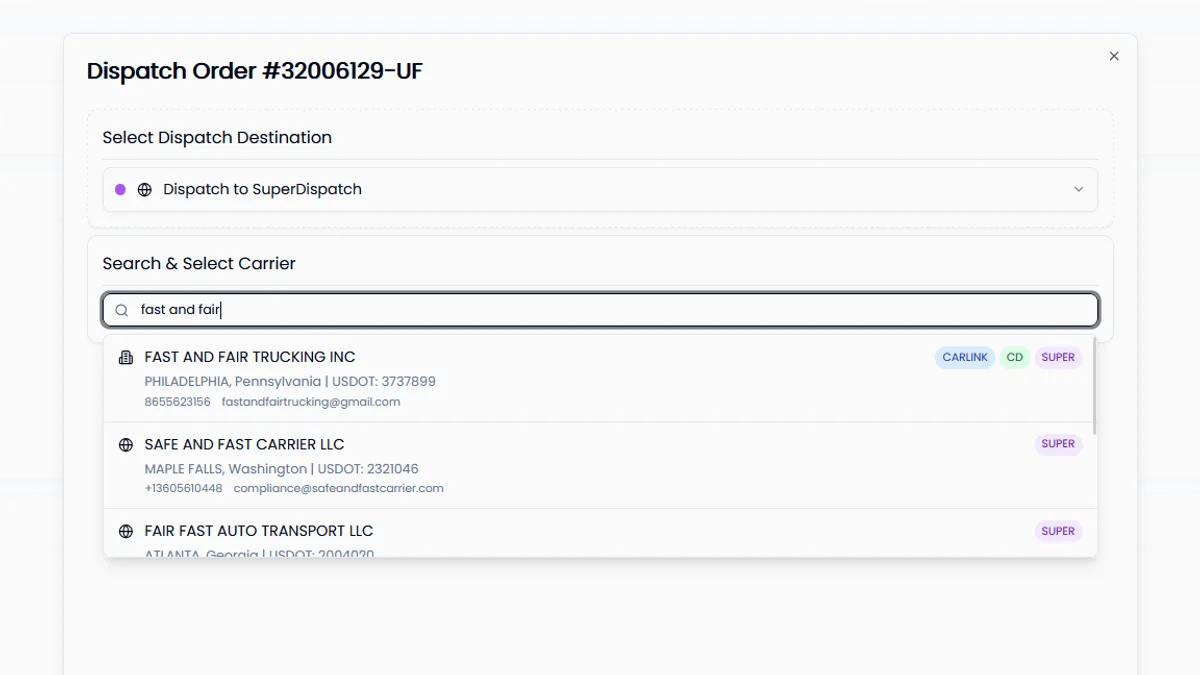
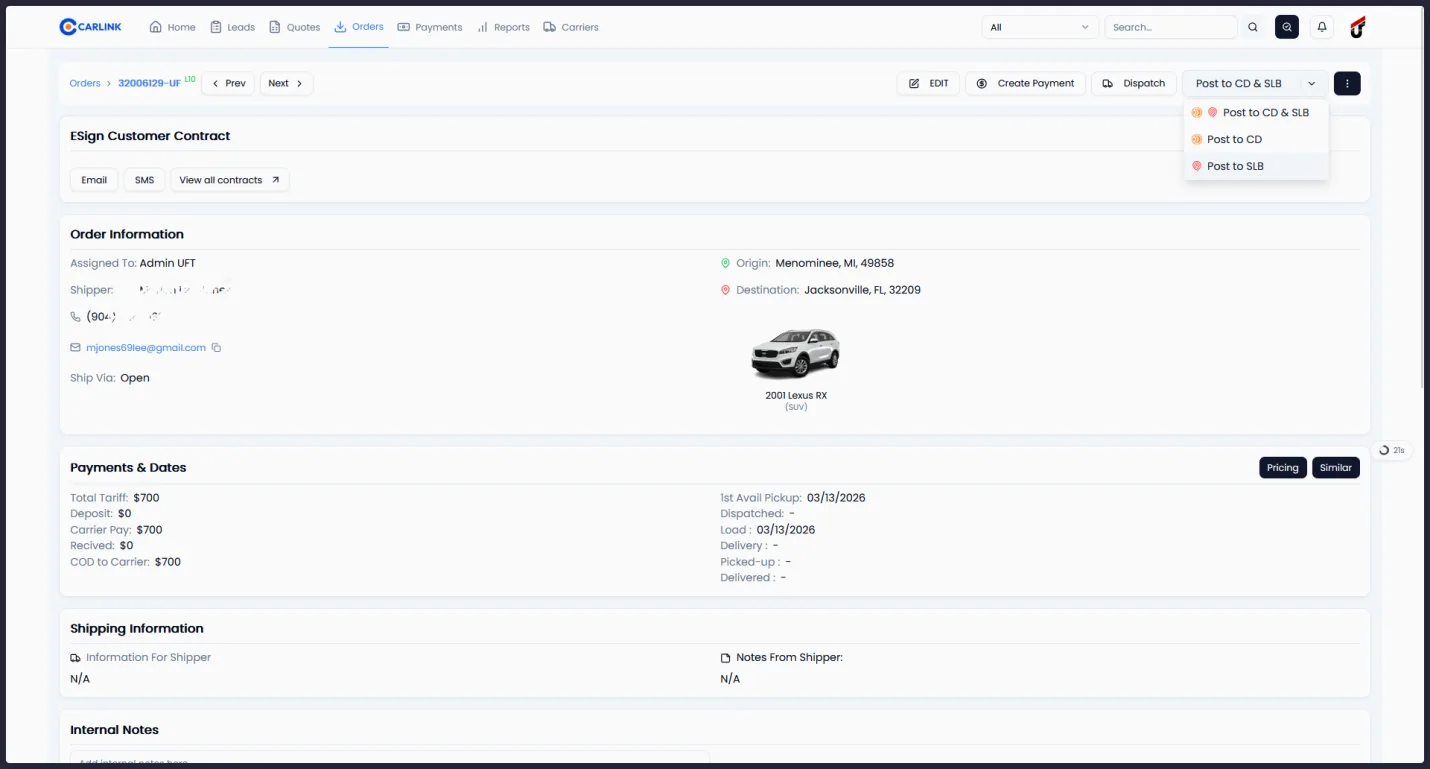
Carlink unifies the dispatch flow. Search carriers across Carlink's database, Super Dispatch, and Central Dispatch in a single query. Generate BOLs and dispatch sheets with one click. Webhook events keep status updated in real time. When a carrier accepts an offer, Carlink automatically un-posts from every other loadboard you used.
What you actually get.
Everything Dispatch ships with.
Concrete capabilities you can verify with your own data on day one.
- Unified search across Carlink + Super Dispatch + Central Dispatch databases
- Post to all three loadboards in one click — Carlink, SD, CD
- Carrier verification fields: MC, USDOT, insurance status, prior dispatches with you
- Auto-generated BOL + Super Dispatch dispatch sheet in PDF
- Webhook status sync (typical latency under 5 seconds)
- Background sync runs every 10 minutes as fallback
- Auto-un-posting on carrier acceptance prevents double-booking
- 52,897 loads dispatched on Carlink across six brokerages
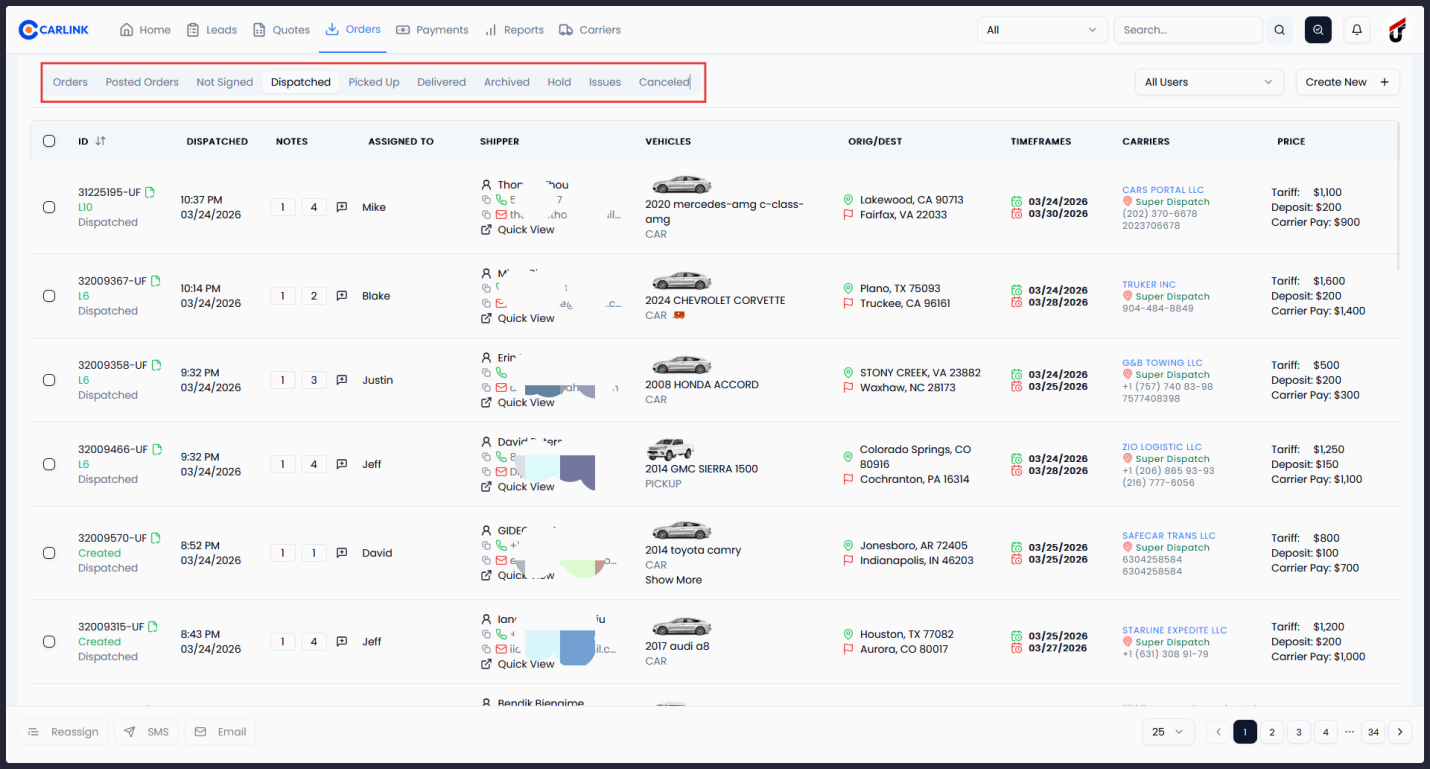
- Status mapping: Pending → Dispatched → Picked Up → Delivered → Hold → Canceled
Three steps. That's it.
Order accepted
Carlink pre-ranks suggested carriers by past lane experience with you, current rate-per-mile, insurance status, and rating. The agent sees the best options first.
Search, select, send the offer
Filter by USDOT, MC, insurance status, rate range. Pick a carrier → BOL generates → dispatch offer ships through your loadboard of choice. One modal, one click.
Status flows back automatically
Carrier marks Picked Up / Delivered → webhook updates Carlink in seconds → customer gets a 'dispatched' or 'delivered' SMS + email automatically.
How a typical day looks.
11 AM Tuesday: a Phoenix → Dallas Honda Civic is accepted. Carlink ranks twelve carriers from your past Phoenix–Dallas lane. You pick Lone Star Logistics — six prior loads with you, $1.92/mile last time. Click 'Dispatch via Super Dispatch'. The BOL emails to their dispatcher. At 2 PM the carrier accepts; Carlink un-posts from Central Dispatch automatically and texts your customer 'Your car is dispatched, ETA Thursday'. Thursday 4 PM the carrier marks 'Delivered' on Super Dispatch — your dashboard updates inside four seconds and the customer gets their final invoice link by email.
// Pulled from the brokerages running on Carlink today
Dispatch, answered.
Go deeper on dispatch.
How to Vet Auto Transport Carriers (And Avoid Double Brokering & Fraud)
A broker's carrier vetting checklist: verify USDOT and MC authority on FMCSA SAFER, confirm cargo insurance the right way, check safety records, and spot the red flags of double brokering and carrier identity theft before you dispatch.
Central Dispatch vs Super Dispatch: Which Loadboard Should You Use?
Central Dispatch has the reach, Super Dispatch has the workflow. A side-by-side comparison for auto transport brokers — carrier network, pricing, dispatch flow, and why most brokerages end up running both from one place.
Carlink + Super Dispatch Integration
Manage your entire Super Dispatch workflow from within Carlink. Post to loadboards, dispatch to carriers, track orders in real time, and access documents - all without switching platforms.
See Dispatch with your own data.
15-minute demo. Walked through by an operator.