


Carlink + Super Dispatch
Integration
Manage your entire Super Dispatch workflow from within Carlink. Post to loadboards, dispatch to carriers, track orders in real time, and access documents - all without switching platforms.
One screen. Every dispatch.
Integration overview
Carlink is a full-cycle auto-transport CRM that integrates deeply with Super Dispatch to allow brokers to manage their entire dispatch workflow from a single platform. Through this integration, brokers can perform all core dispatch operations without leaving the Carlink interface, eliminating the need to switch between multiple systems.
Key capabilities
- Post orders to the Super Dispatch Loadboard with one click
- Search and select carriers across multiple databases simultaneously
- Send dispatch offers directly to carriers via Super Dispatch
- Track order status in real time through webhook event notifications
- Receive and respond to carrier load requests
- Access dispatch documents (eBOL and dispatch sheets)
- View Super Dispatch pricing insights with confidence scores
- Automatically unpost from loadboards when a carrier accepts an offer
Explore the features behind this integration
Want it set up for your brokerage? Talk to the Carlink team.
Integration functionality
Order posting to loadboard
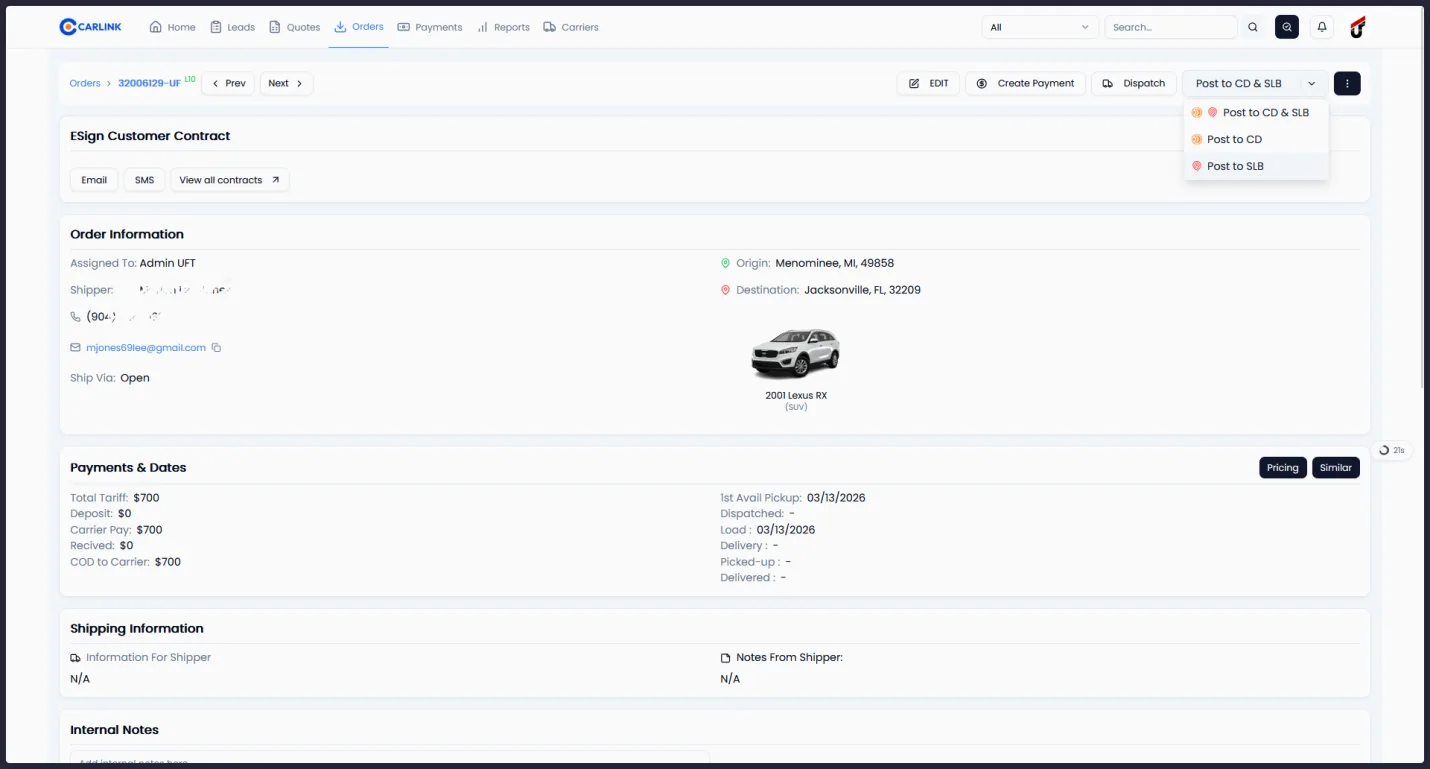
Brokers can post any order from Carlink directly to the Super Dispatch Loadboard. The system automatically maps all relevant order data including vehicle details, pickup and delivery locations, dates, pricing, payment terms, and customer information.
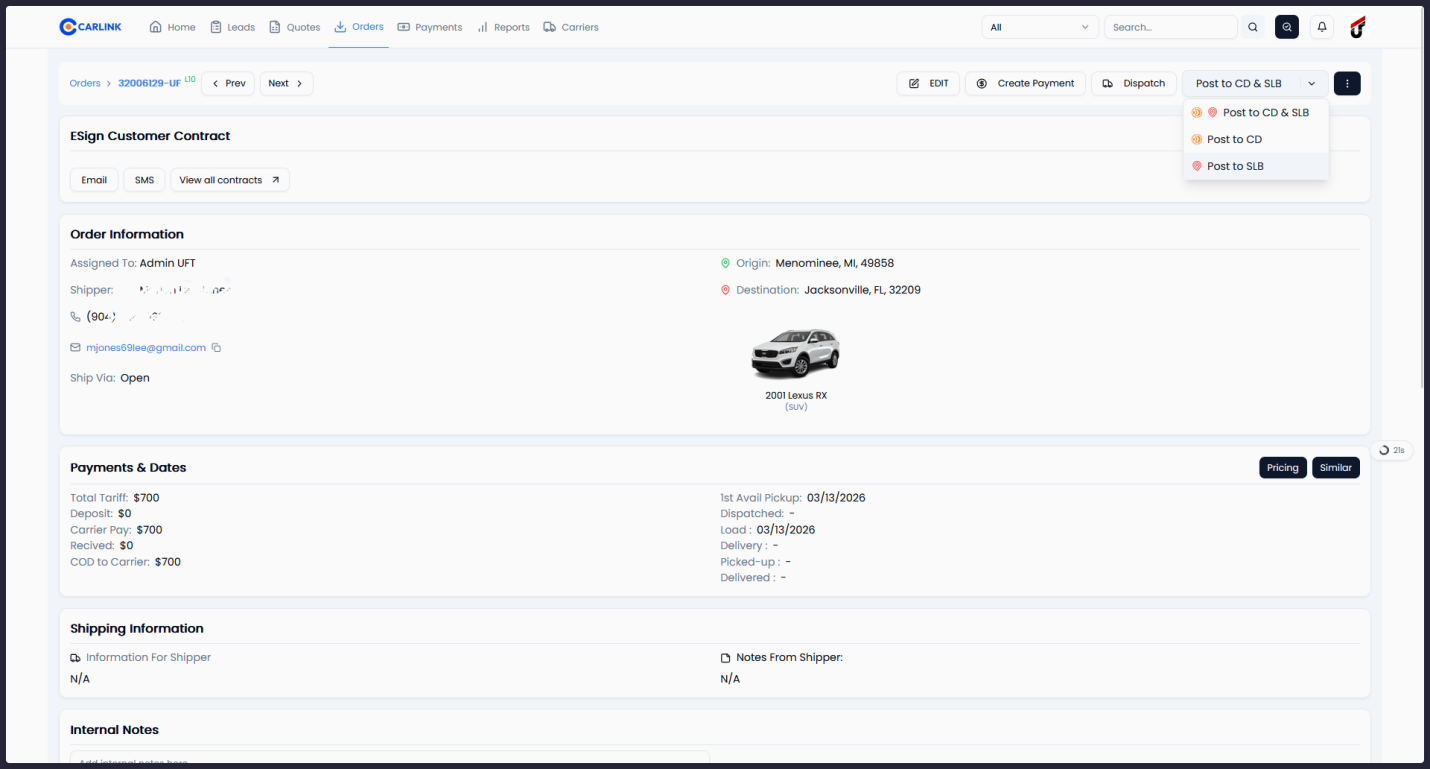
- One-click posting - from the order detail page
- Automatic field mapping - for vehicles, locations, pricing, contacts, and dates
- Multi-loadboard support - post to Super Dispatch and Central Dispatch simultaneously
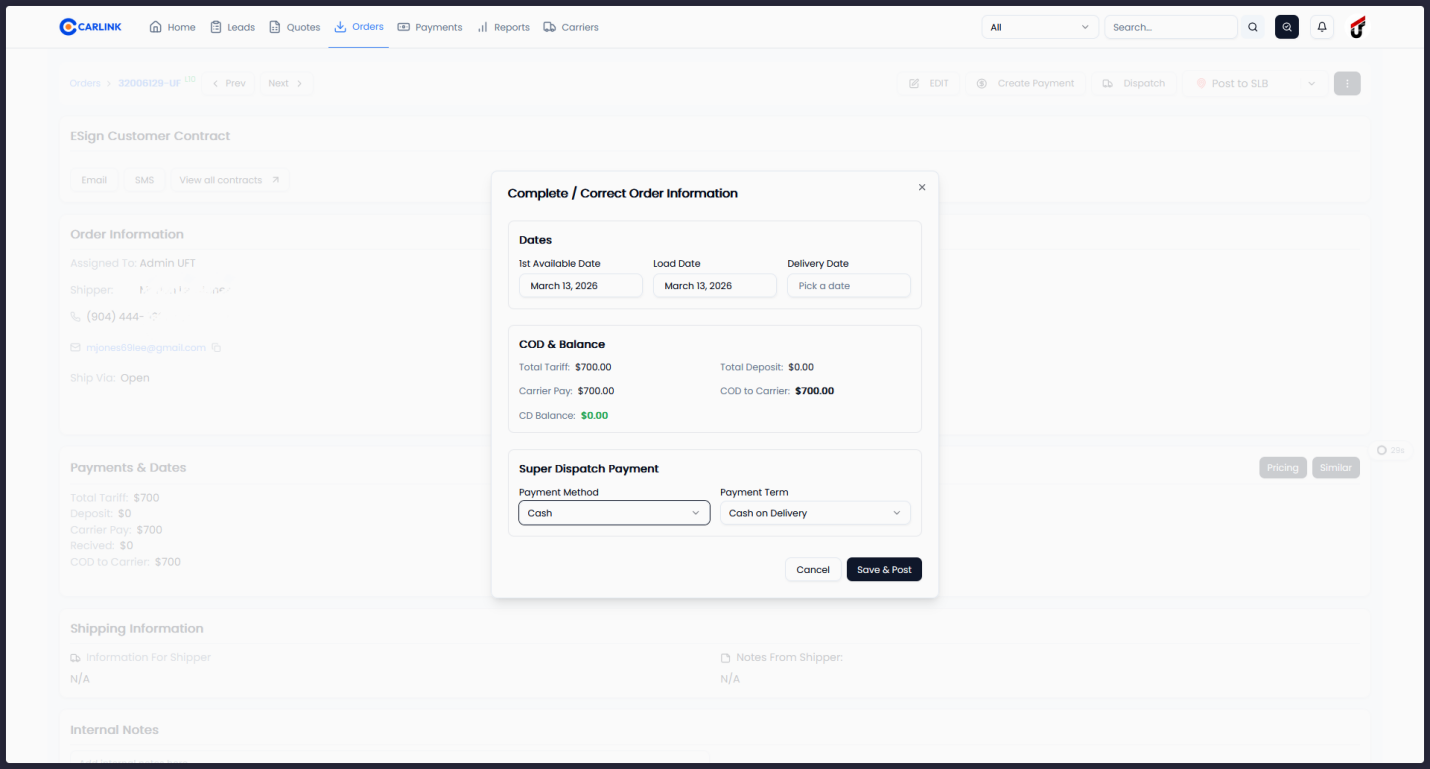
- Payment configuration - select payment method (Cash, Check, ACH) and terms at time of posting
Dispatch and offer management
Brokers can send dispatch offers directly to carriers through Super Dispatch. The full offer lifecycle is managed within Carlink, from sending the initial offer through carrier acceptance, pickup, delivery, and completion.
- Direct offer sending - to carriers via Super Dispatch
- Payment configuration - set method and terms during dispatch
- Automatic status updates - when the carrier responds to the offer
- Automatic loadboard unposting - when a carrier accepts, preventing double-booking
Unified carrier search
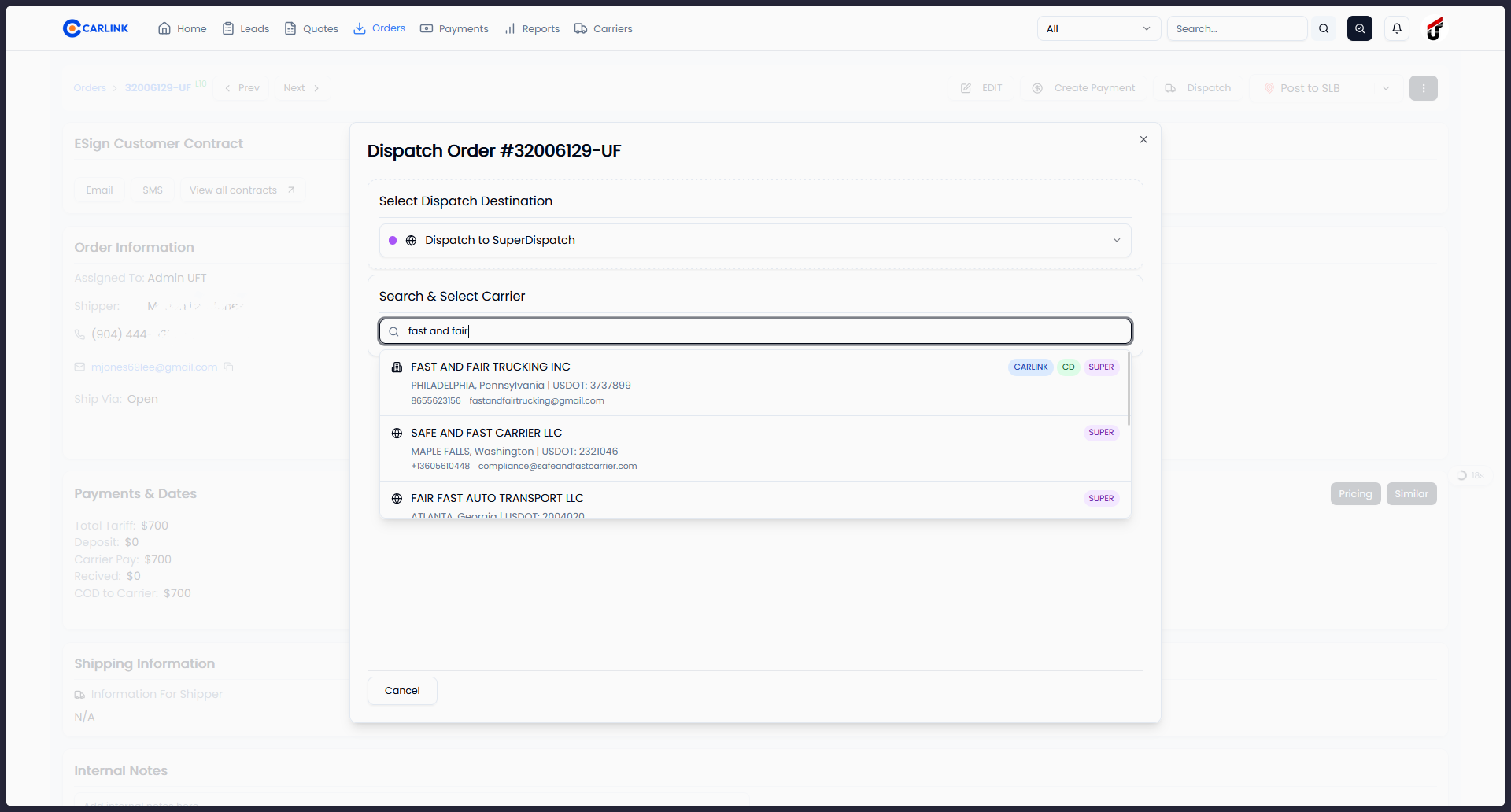
Carlink provides a unified carrier search that queries multiple data sources simultaneously, giving brokers the broadest possible view of available carriers.
Search sources
Results are grouped and deduplicated by company, with clear source badges. Search by company name, USDOT, MC number, email, or phone.
Real-time status synchronization
Carlink uses Super Dispatch webhook events to keep order status updated in real time. Status changes are reflected within seconds. A background synchronization process runs every 10 minutes as an additional safeguard.
| Super Dispatch | Carlink |
|---|---|
| Pending | Not Signed |
| Accepted / Booked | Dispatched |
| Picked Up | Picked Up |
| Delivered | Delivered |
| On Hold | Hold |
| Canceled | Dispatch Canceled |
Pricing insights
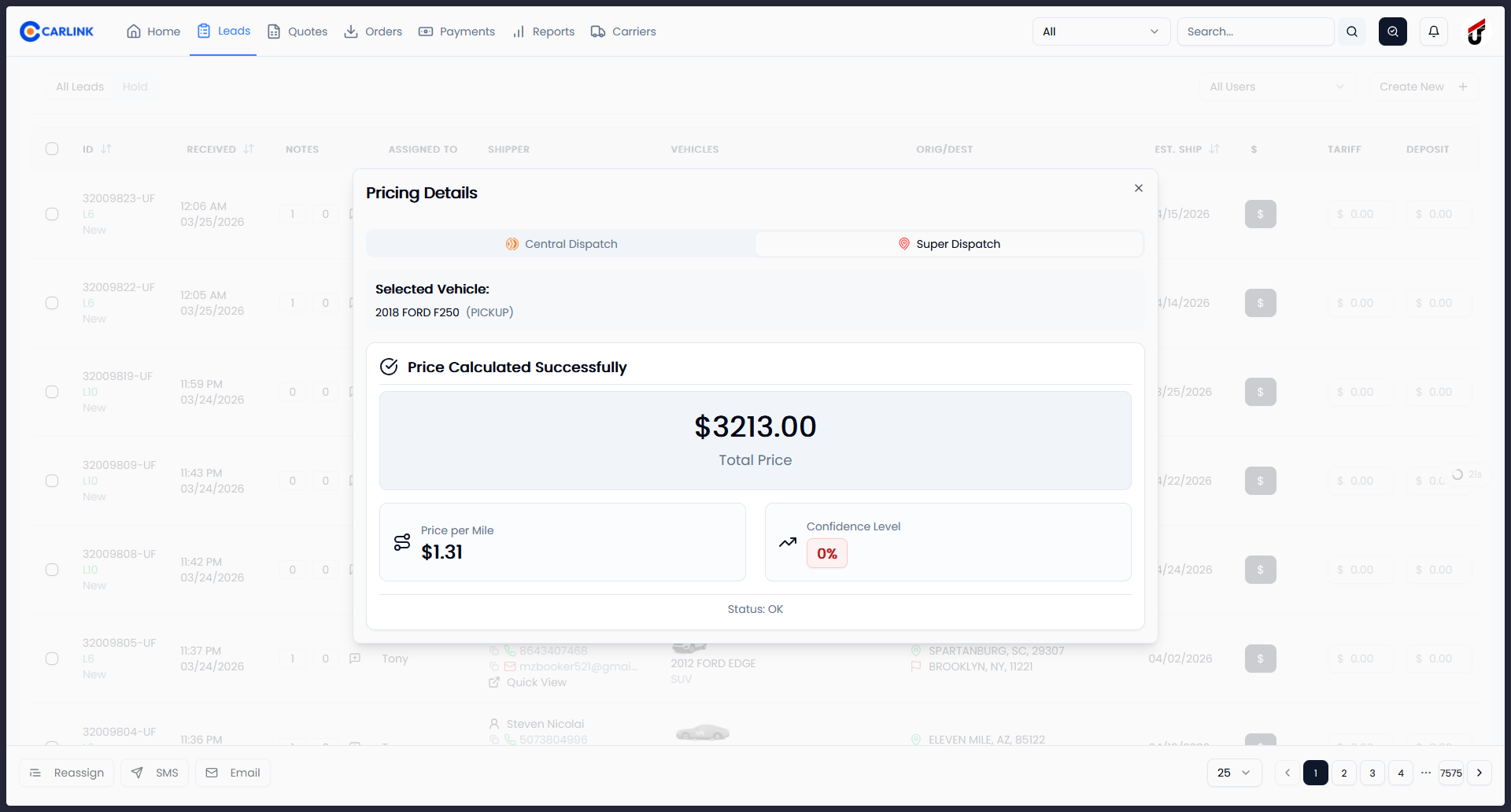
Brokers can retrieve Super Dispatch's recommended pricing for any route directly within Carlink's pricing tool.
- Recommended total price - for the route
- Price per mile - calculation
- Confidence score - indicating the reliability of the price estimate
Pricing insights are displayed in a dedicated Super Dispatch tab alongside other pricing sources, allowing brokers to compare and make informed decisions.
Document access
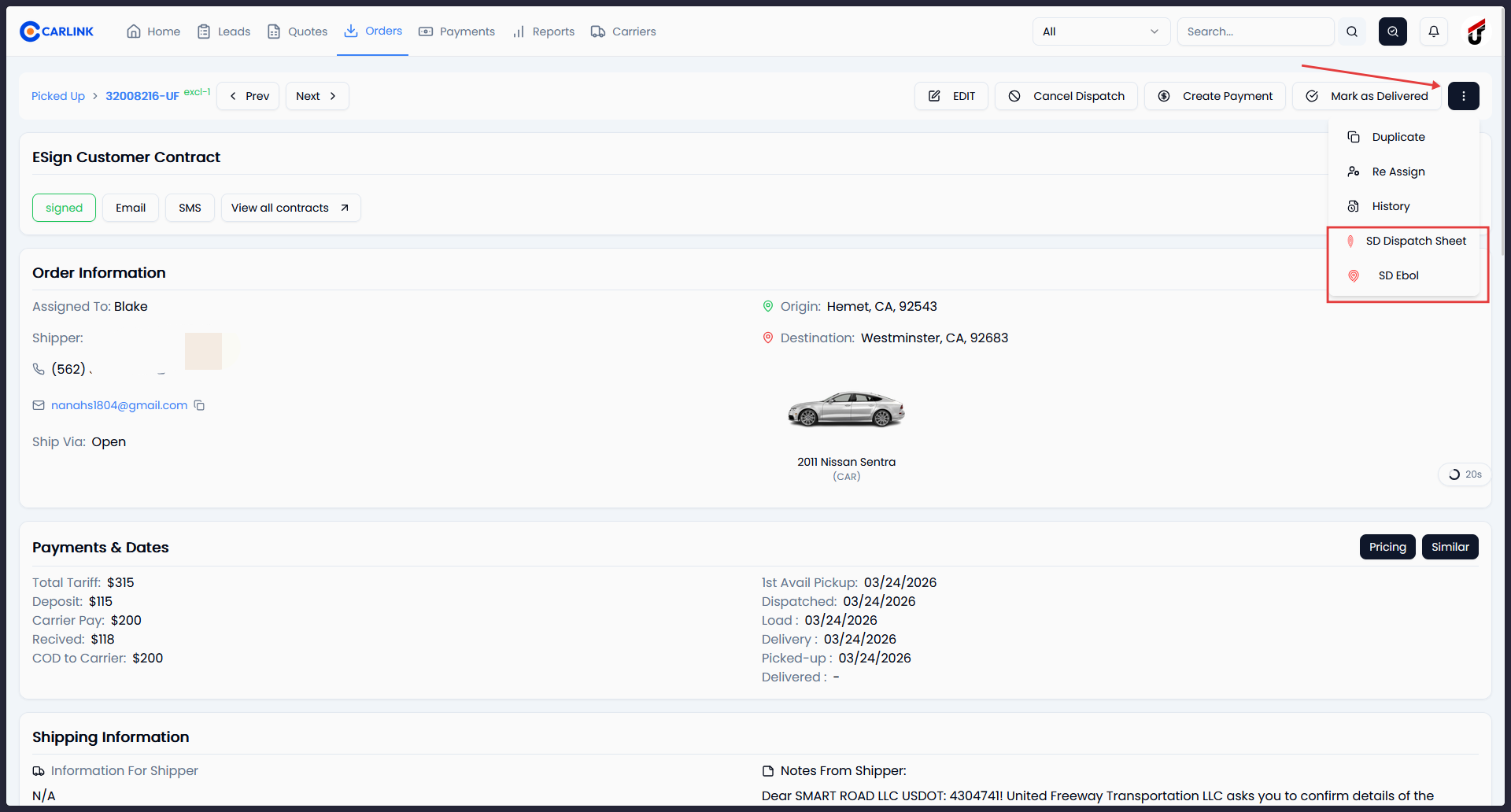
Brokers can download dispatch documents directly from Super Dispatch without leaving the Carlink interface.
- Dispatch sheet - the dispatch agreement document
- Electronic Bill of Lading (eBOL) - the shipment receipt and condition report
Load request notifications
When carriers submit load requests through Super Dispatch, brokers receive instant notifications with full details.
- Real-time notifications - in-app alerts and via Telegram
- Carrier details - company name, USDOT, contact information
- Request details - requested price, preferred pickup and delivery dates
See it in action
Each screenshot captures a key interaction point within the Carlink interface.
One-Click Posting to Super Dispatch Loadboard
From the order detail page, brokers can post directly to the Super Dispatch Loadboard using the "Post to SLB" button. Multi-loadboard support allows posting to Super Dispatch and Central Dispatch simultaneously.
Dispatch and Offer Management
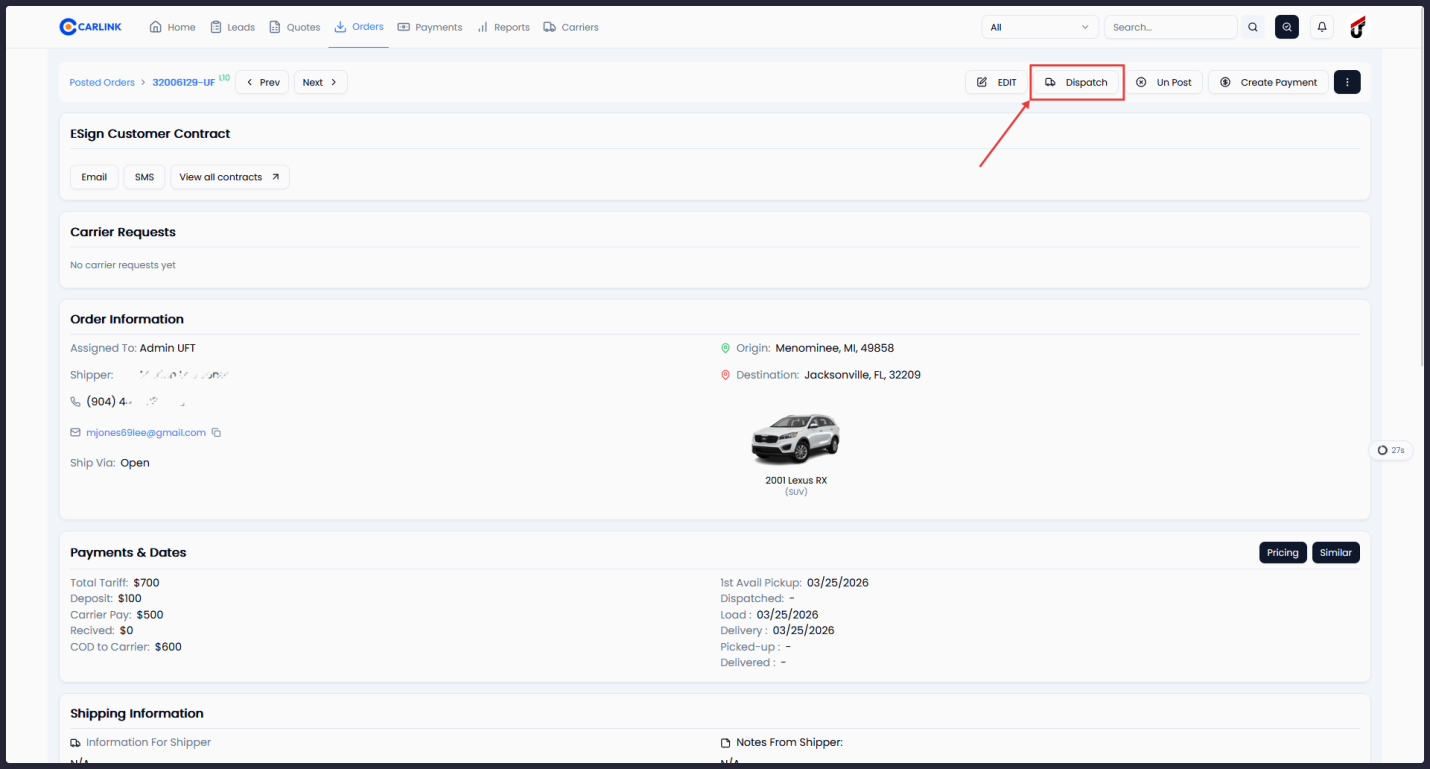
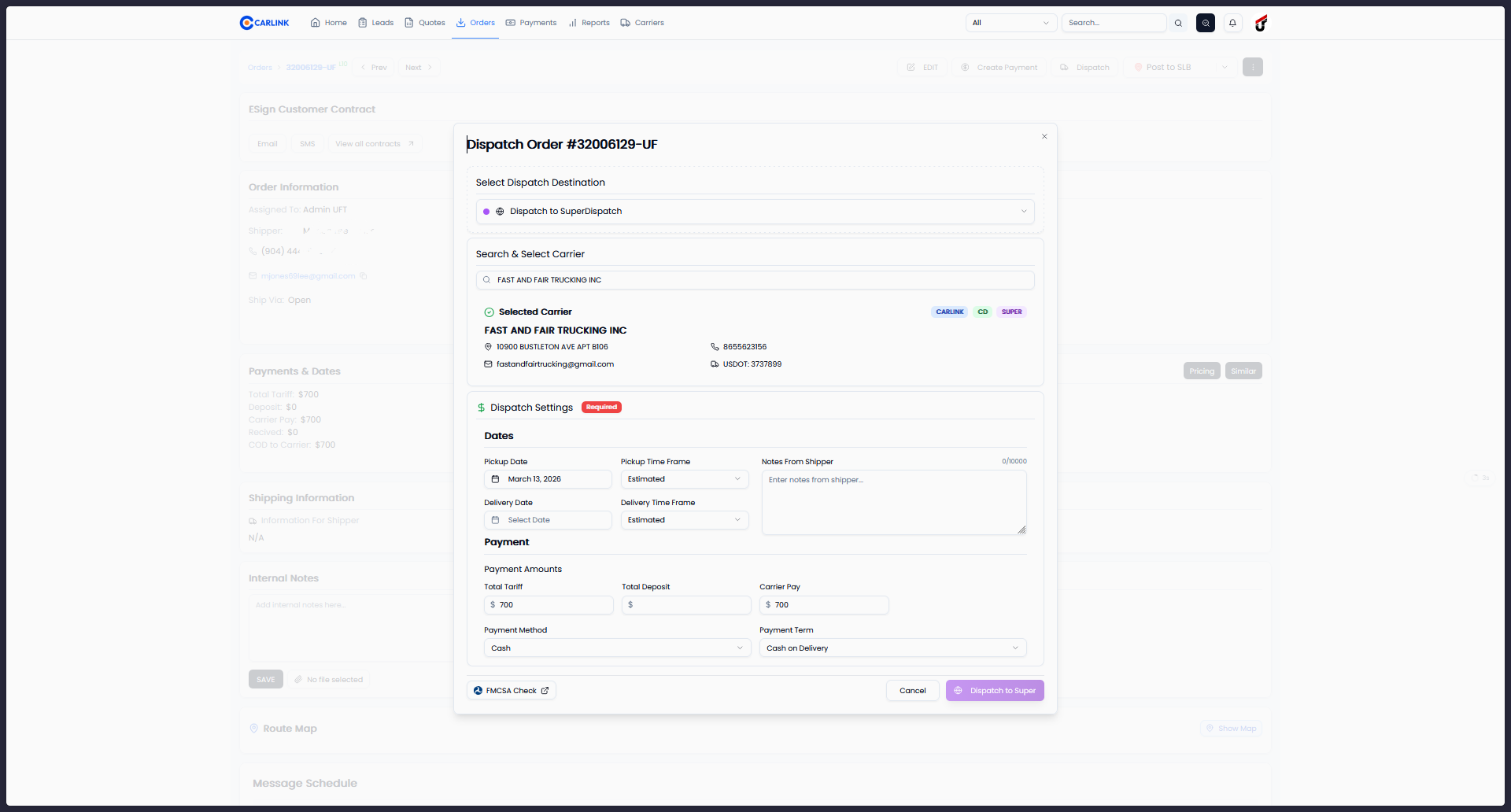
Brokers select Super Dispatch as the dispatch destination, search for carriers across multiple databases, configure payment settings, and send dispatch offers - all from a single modal.
Real-Time Status Synchronization
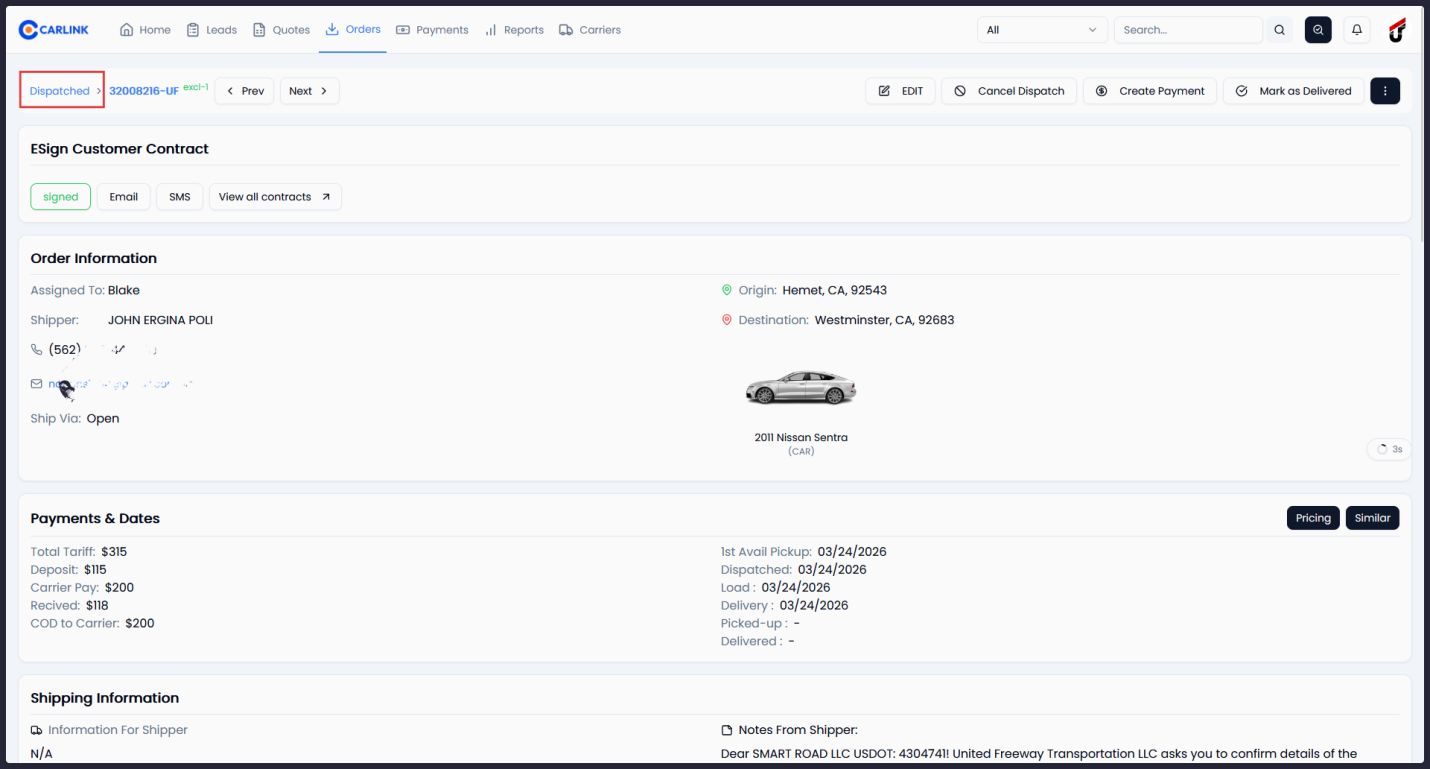
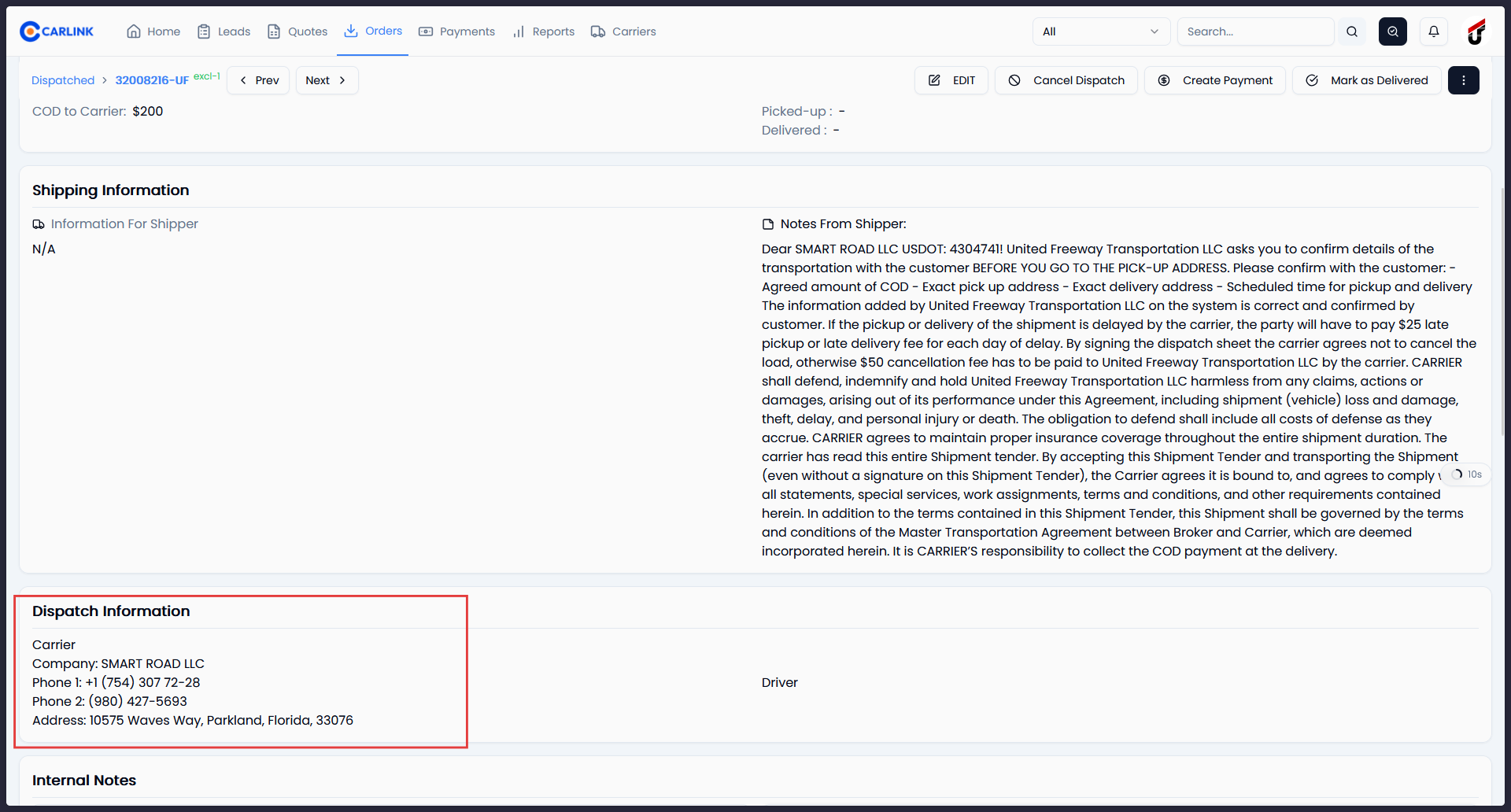
Once dispatched, order status updates are reflected in Carlink within seconds via webhook events. Carrier and dispatch information is displayed directly on the order page.
Super Dispatch Pricing Insights
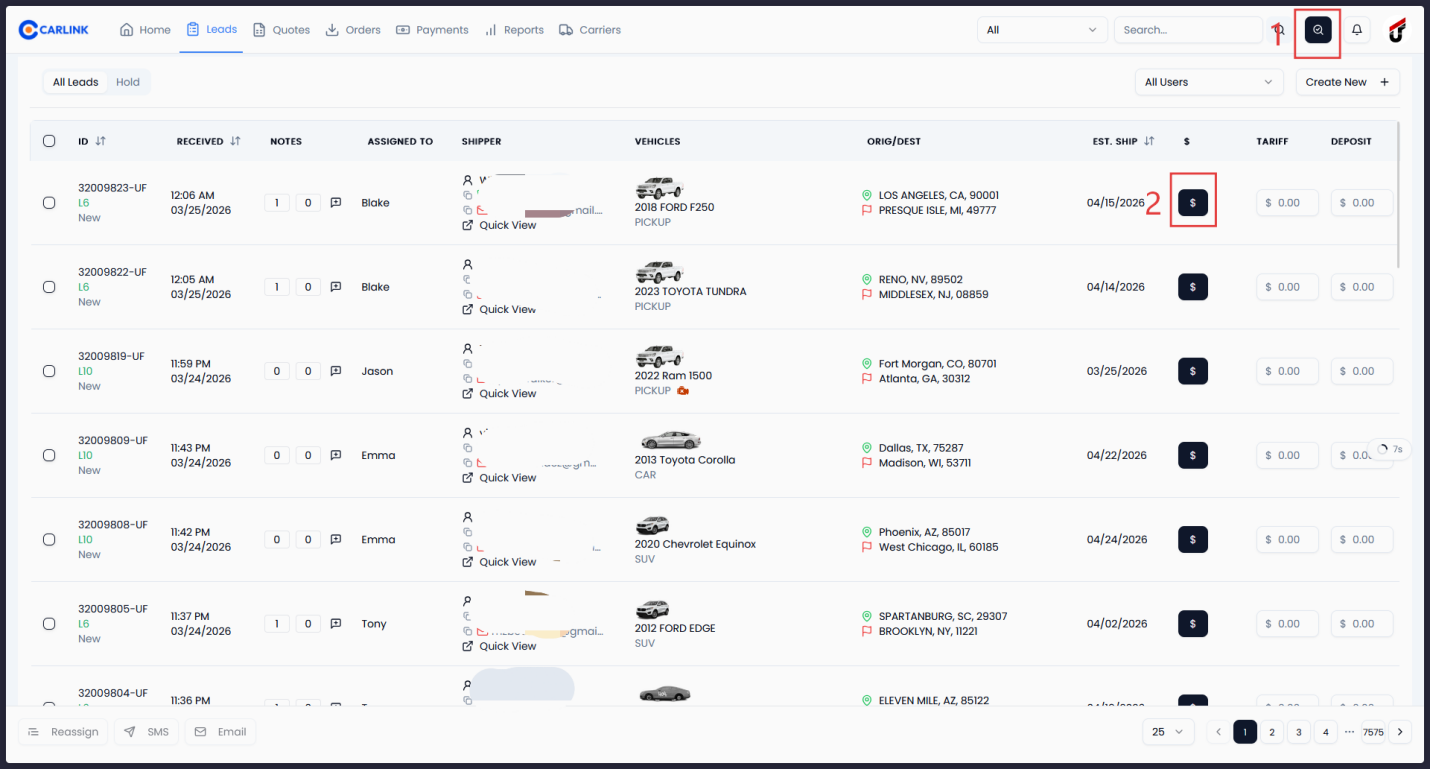
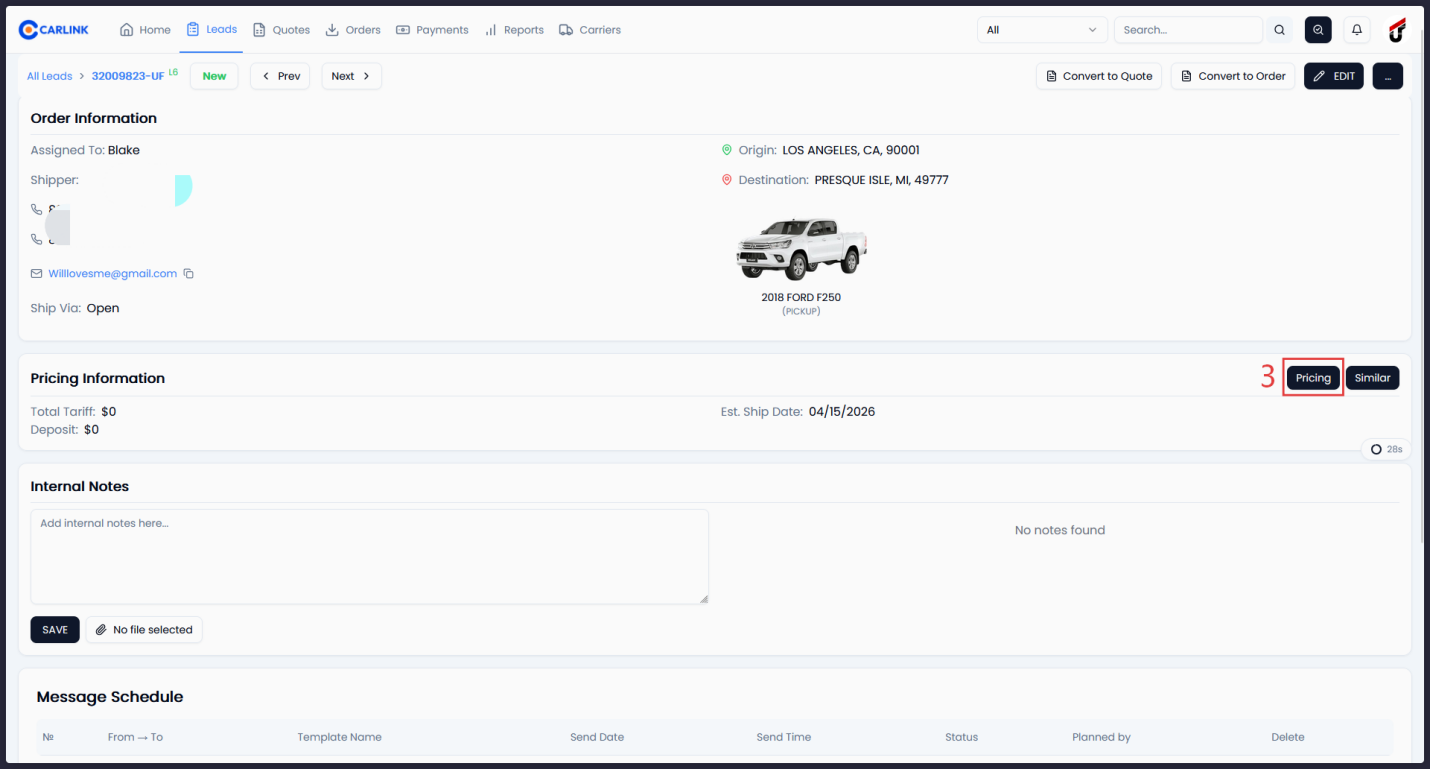
Brokers can check Super Dispatch recommended pricing from multiple locations: the leads list, lead detail page, or order detail page. Pricing includes total price, price per mile, and a confidence score.
Document Access
Brokers can download the Super Dispatch Dispatch Sheet and Electronic Bill of Lading (eBOL) directly from the order actions dropdown menu.
Orders List with Dispatch Source Labels
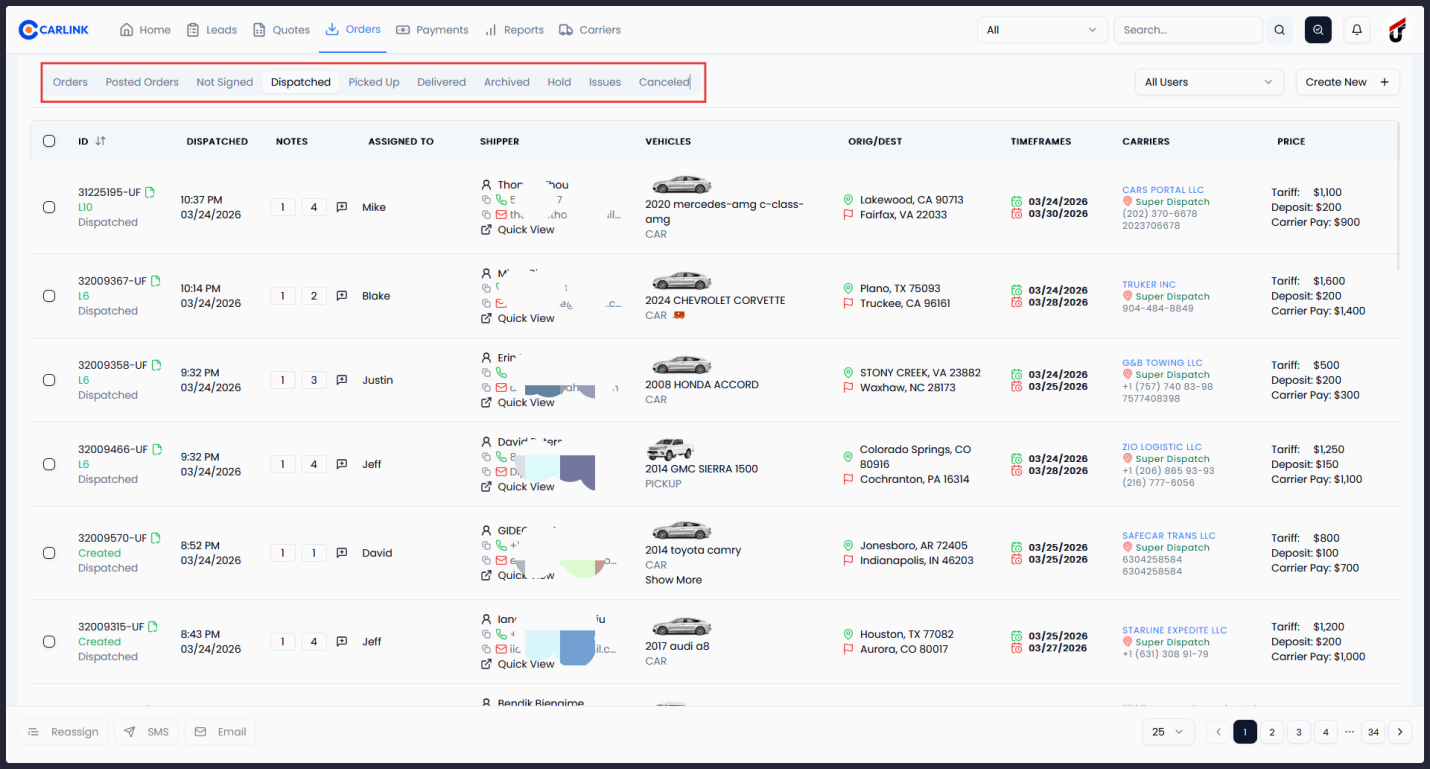
The orders table displays dispatch source labels (Super Dispatch) alongside carrier information, giving brokers a clear overview of all dispatched orders and their platforms.
Integration setup
Prerequisites
- Active Super Dispatch Shipper TMS account
- Carlink CRM account
Configuration
The integration is configured by the Carlink team on behalf of the broker. The setup process is straightforward:
Super Dispatch API credentials are connected on the Carlink server
Webhook subscriptions are automatically established on application startup
The integration becomes immediately available to all users in the organization
No additional setup is required from the broker or their team. Once the Carlink team enables the connection, all Super Dispatch features are accessible from the order interface.
User workflow
Once the integration is enabled, brokers interact with Super Dispatch entirely through the Carlink interface:
Open any order in Carlink
Click "Post to SLB" to publish the order to the Super Dispatch Loadboard
Use Dispatch → Super Dispatch to search for a carrier and send an offer
Monitor order status - updates appear automatically via real-time webhooks
Download documents (dispatch sheet, eBOL) from the order actions menu
If something breaks
| Issue | Possible cause | Solution |
|---|---|---|
| Post to SLB fails | Missing vehicle data, dates, or pricing | Ensure the order has at least one vehicle, valid dates, and pricing |
| Payment method error | Payment method not selected | Select Cash, Check, or ACH before dispatching |
| Carrier not found | Carrier not in Super Dispatch database | Search by USDOT or MC number instead of name |
| Status not updating | Webhook connectivity issue | Contact Carlink support to verify webhook subscriptions |
| Document download blocked | Browser popup blocker | Allow popups for the Carlink domain |
Frequently asked questions
About the platform
About Carlink
Carlink is a modern CRM and operations platform designed specifically for auto-transport brokers. It manages the full shipment lifecycle - from lead intake through dispatch, delivery, and payment tracking - in a single, modern web interface.
{companyName}.carlink.proReady to streamline your dispatch?
See how the Carlink + Super Dispatch integration can save your team hours every day.
More from the Carlink blog
Central Dispatch vs Super Dispatch: Which Loadboard Should You Use?
Central Dispatch has the reach, Super Dispatch has the workflow. A side-by-side comparison for auto transport brokers — carrier network, pricing, dispatch flow, and why most brokerages end up running both from one place.
What Is an Auto Transport Broker? (And How They Actually Make Money)
A plain-English guide to what an auto transport broker is, how brokers differ from carriers, how they make money on the margin between customer and carrier, and what it takes to operate one legally.
Why Spreadsheets Are Killing Your Auto Transport Brokerage
Excel and Google Sheets feel free — but they quietly leak money at every step of a brokerage: lost leads, slow quotes, double-bookings, missed carrier payments, and decisions made on stale data. Here's the real cost, and when to switch.